
Moving FNSKU and SSCC work off handhelds changes far more than print speed. The moment a labeler does the applying, identification stops being an operator’s judgment and becomes a machine event: something must tell the line which unit or carton is passing, the correct code must arrive from your order data, the label must land in a place a scanner can read every time, and something must catch the ones that fail. Sellers who automate only the sticking, and leave identity decisions to people, usually make their error rate faster instead of smaller. This page separates the two jobs behind the acronyms, maps the failures that appear after automation, and ends with the acceptance loop worth writing into a purchase order for a print and apply labeling machine.
What Actually Changes When the Handheld Retires
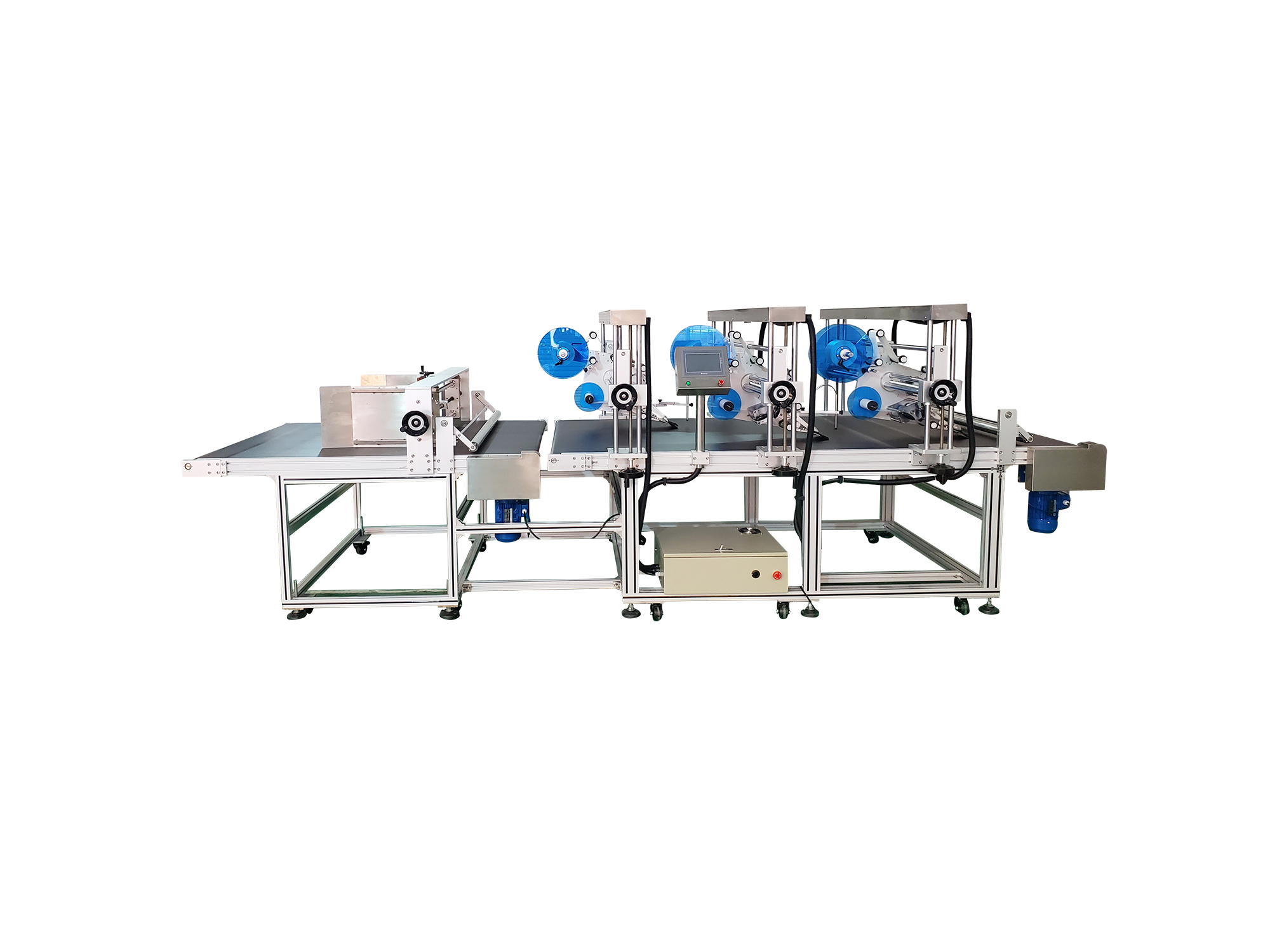
A handheld workflow is serial and person-paced: someone finds the right label, peels it, places it, and hopes the next person is as careful. An automated line replaces that with a closed loop. A scanner, a conveyor sensor or a message from your warehouse system identifies the unit; the system requests the label data; the print-and-apply head prints and applies it at a fixed point; a verification scanner reads the result; and failures divert to a reject lane instead of a customer complaint. Throughput stops depending on how many hands you staff and starts depending on how reliably the line stays fed. Just as important, every applied label leaves a record, which turns later disputes with a marketplace or a retail chain into a lookup instead of an argument. The full equipment picture for this environment is gathered on our e-commerce and logistics labeling page.
Two Different Jobs Hiding Behind One Word
FNSKU and SSCC automation are different projects with different machines, and treating them as one is the first planning mistake. One identifies the sellable unit, the other identifies the logistic unit, and they fail in different ways.
FNSKU: item-level identity
The FNSKU ties one sellable unit to one seller listing inside a marketplace’s network, so the labeler’s job is associating the right code with the right physical item at speed. Marketplace prep rules add placement constraints: the code prints on white, removable, non-reflective stock, other visible barcodes get covered where required, quiet zones stay clear, and the label sits flat, away from edges, corners and curves. A print-and-apply head handles the variability only if the items present themselves consistently; polybags, pouches and small cartons each present differently, so item-level automation is a presentation problem as much as an application problem. When mixed-SKU units share the line, the scan-to-label association is the whole ballgame, because a fixed-rate applicator with no identification applies the wrong FNSKU faster than any human ever did.
SSCC: logistic-unit identity
The SSCC identifies a carton or pallet as a logistic unit and links it to shipment data, and the GS1 logistic label that carries it has its own grammar: defined placement on the face of the unit, barcodes positioned for scanning, and, on pallets, duplicate labels on two adjacent sides so one survives the journey. The full layout rules live in the GS1 logistic label guideline, and they are machine-relevant, because a pallet label applied low, high or on the wrong face defeats its own purpose no matter how crisply it prints. Case and pallet labeling therefore rewards bigger print-and-apply stations, corner-wrap or dual-face application, and a data link that closes the association between the code, the contents and the shipment record.
Symptom, Cause, Fix: What Breaks After Automation
Automated carton labeling fails in repeating patterns. Match the symptom before touching settings, because the wrong fix usually costs a reprint or a missed pickup.
| Symptom on the line | Actual cause | What to change |
|---|---|---|
| Wrong FNSKU on units of a mixed order | Scan-to-label association missing; the applicator runs at a rate while data waits | Trigger each label from a verified scan or a system record, and interlock apply on match |
| First-read failures at the receiving dock | Label over a seam, edge, curve or a reflective surface | Fix the placement zone and add a corner-wrap head or presentation fixture, not just print darkness |
| Labels skew or wrinkle on varied cartons | One setup fed boxes beyond its size range | Split the carton family across setups or specify quick-change parts sized at quotation |
| The same SSCC appears twice | Codes generated or reused outside the shipment system | Let the WMS own SSCC creation and have the line reject a code it has seen before |
| Line stops mid-shift at the labeler | Roll change, ribbon change or print-head service treated as breakdowns | Stock consumables at the line, train a change procedure, and log it as planned time |
Notice that only one row is purely a machine fault. The rest live in the handshake between your data and the applicator, which is why the acceptance test later in this page exercises the handshake, not just the head.
Choosing Where to Automate First
Budgets are finite and box shapes are endless, so sequence the work instead of automating everything at once. Order of attack matters more than brand of head.
Start at the station that feeds the marketplace
If rejections come from unit-level labeling, automate the item station first: consistent infeed, a scan that triggers the FNSKU, verification before the unit leaves the station. Fixing the point where rejections originate pays before raising speed anywhere else. A single head here usually suffices, and semi automatic assist stations running 15 to 30 pieces per minute often clear the backlog while the automatic loop is being built around 40 to 300 pieces per minute lines.
Then take the case and pallet faces
SSCC and case labels follow once item flow is stable, because their data depends on knowing what went into the box. Print-and-apply heads sized for larger GS1 labels, corner-wrap application for edge-to-edge codes, and dual-face pallet application are standard options; the right mix depends on pallet presentation and stretch-wrap order. Confirm wrap and placement against your actual pallet pattern, since wrap tension can hide a perfectly applied label.
Leave the exceptions a lane of their own
Damaged cartons, unreadable host items and no-read verifications never disappear; they just get cheaper when diverted automatically. An exception lane with a bench, a handheld and a record keeps the main line running, and it generates the defect data you need to fix upstream presentation.
Print-and-Apply Versus Preprinted Roll Stock
Some sellers automate application but keep printing batches of code rolls elsewhere. That hybrid works only while identity is static, and e-commerce work is rarely static: FNSKU mappings change, SSCCs are unique by definition, and preprinted batches invite sequence errors. The honest comparison:
- Print-and-apply: one system prints the variable code and applies it in one motion, so code and unit never separate. Costs more per station, eliminates the batch-tracking layer, and needs ribbon or thermal-head care as planned maintenance.
- Preprinted roll stock: cheaper labels and simpler heads, but the correct roll must find the correct carton, which reintroduces the human judgment you were automating away, and uniqueness of SSCC codes cannot be printed in advance at all.
For anything serialized, print-and-apply is not an upgrade, it is the only architecture that closes the loop. For static artwork on stable SKUs, roll stock remains a fair choice, and our label applicator machines cover that case without a printer attached.
The Acceptance Loop to Write Into the Order
Buy the loop, not the head. These acceptance items turn a spec sheet into evidence, and every one of them is demonstrable at the factory before shipment:
- Feed the FAT your real cartons, polybags and pallets, in the mix of sizes you actually ship, plus label stock from your real supplier.
- Run the wrong-label challenge: present a unit whose identity does not match the pending label and require the line to verify, reject and log rather than apply.
- Time a changeover between your smallest and largest carton, on camera, and put the steps that passed into the commissioning sheet.
- Demonstrate the exception path: a no-read, a duplicate SSCC and a missing label each divert to the lane, with the record written.
- Verify placement against the GS1 zones and marketplace placement rules on the worst carton, not the demo box.
- Freeze retest triggers: new carton supplier, new label stock, or a faster contracted rate reopens the test.
Every machine we ship is tested with the customer’s own cartons and labels before dispatch, and the video goes back to the buyer for approval; across more than 50 countries and over 500 factories served, that filmed loop has settled more disputes than any datasheet. Where a project needs a head matched to an odd carton family, our FT-600 print and apply machine page shows the configuration options we quote from, and minimum order quantity is one machine, so a single pilot line is a legitimate way to start.
Short Answers on FNSKU and SSCC Automation
Do I need different machines for FNSKU and SSCC labels?
Usually yes in scale and format, even when the brand is the same. Item-level FNSKU work lives on compact heads matched to product presentation, while SSCC work needs larger labels, bigger print engines and often corner-wrap or dual-face application on cases and pallets. Buyers who start with one loop, prove it on film, then extend to the second station tend to spend less than buyers who ordered both at once on assumptions.
Will automation remove my labeling labor entirely?
No, and a quote that promises that deserves suspicion. Automation removes the walking, peeling and searching, then moves people to feeding, replenishing and the exception lane. What it truly removes is the per-unit judgment call, because verification becomes a machine step that either passes or diverts. Lines that plan the exception lane from day one run; lines that treat every failure as a breakdown go back to handhelds within a quarter. See more buyer questions on our labeling machine FAQ, or send your carton mix and shipment volumes and we will map which station to automate first.
What data does an automated labeler need from my systems?
Less than sellers fear and more than a bare label file. At minimum the line needs a trigger that identifies the unit or carton, the code or template that belongs to it, and the rule for what to do on a mismatch, a no-read or a duplicate. Some buyers deliver that from a warehouse system, others from a controlled print queue; what matters is that the association is made by data before the label is applied, not reconstructed afterwards. How your team prefers to feed the line is confirmed against your workflow at quotation.
