
A labeling machine’s control system is three things a buyer receives as one invoice line, and the invoice hides the split. The application program is the logic the builder wrote. The screen application is the interface an operator touches every shift. The support relationship is the promise that a correction can still be obtained. Only the third expires quietly, and the first two were paid for when the machine shipped.
The purchase order decides all three, and four clauses carry the whole question. A buyer who names four artefacts, the form of the copy, the release conditions and the re-verification test before the deposit is paid holds something usable in year three. A buyer who accepts a sentence such as “the program comes with the machine” holds a compiled download and a telephone number.
According to IEC TR 61131-4, the guidelines exist to assist end-users in their selection and specification of PLC equipment, which places the specifying side of this question with the buyer. A 2026 order can carry every clause.
Why Does a Dead Screen Look Like a Spare-Parts Problem?
A program failure, a screen failure and a support failure are three separate events, and a parts register answers only the second. The program does not wear out. A parameter drifts, a recipe is overwritten, or a technician deletes a rung while chasing a fault, and the machine keeps running with a logic error nobody can see. The screen fails visibly and stops the line, which is why the spare-parts register covers a panel and never a project.
First, a part number buys a device. Second, a project buys the behaviour of the line. Third, an end-of-support notice buys nothing at all.
In practice the year-three call is usually about the third event. The builder has stopped supporting the control system, and the buyer discovers that the archive was never handed over. The requirement, according to IEC 62402:2019, is a plan: a policy, an infrastructure, resolution strategies and a review that names an owner.
Step 1: Name the Four Artefacts Separately
What Counts as a Source Project, and What Is Only a Download?
A source project is the editable set of files that a programmer opens to change machine behaviour, and a compiled download is the file a controller accepts to run the same behaviour with no route back to the edit. The two are not interchangeable, and a buyer who holds only the second has a working machine and no lever.
The four artefacts are separate objects with separate owners. First, the source project. Second, the compiled application that runs today. Third, the screen application with its recipes. Fourth, the licence, key or dongle that lets the software run at all.
For example, the failure is rarely a missing file. A copy exists, arrives on a USB stick, and nobody can open the copy because the tool version, the library set or the licence is absent. An archive nobody can open is a receipt, not a deliverable.
Which Line of the Purchase Order Carries Each Artefact?
Each artefact needs a line of its own, because a generic clause about documentation covers none of the four. A delivery line names the media, the file set and the tool version. A licence line names what the buyer may run and for how long. A rights line names who may edit the logic and who keeps the copyright. A support line names what the builder does with a modified program.
According to IEC TR 61131-4, the end-user is the party the specification is written to serve, and a specification that lists four artefacts remains an end-user document. A supplier can quote each line or refuse one, and a refusal in writing is worth more than a promise on a call.
Step 1 of the handover is therefore a list rather than a conversation: name each artefact, the media, the tool and the owner, and leave nothing under documentation.
Step 2: Choose the Copy, Because Escrow Is Not Delivery
Escrow is a release arrangement, not a delivery. A source project held by a third party is in nobody’s hands until a trigger fires, and the trigger, the beneficiary and the release conditions belong in the agreement, not in a brochure. A buyer who reads escrow and hears delivered has ordered nothing.
Three forms exist, and each has a condition. First, an archive handed over at delivery, which is usable only if the files open on the buyer’s tools. Second, an escrow account, which is usable only if the release events are named and a named beneficiary can act on them. Third, a documented backup held on site, which is usable only if the site records the version and repeats the restore test.
In most cases the third form survives a staff change best, because a labelled folder and a written restore step do not depend on a third party’s goodwill.
Step 3: Decide Who May Edit the Program
Possession of a copy is not permission to change the logic, and a purchase order that conflates the two creates a machine nobody can support. Copyright in the builder’s application normally stays with the builder, while the buyer’s right is a licence to run and, sometimes, to modify. The order has to say which one the buyer bought.
A workable split names three things. First, who may edit: the builder only, the builder and a named integrator, or the buyer’s own technician. Second, what an edit leaves behind: a dated version, a change note and a copy of the previous build. Third, which version the support line treats as current, because a support engineer reading a modified program is debugging someone else’s work.
For instance, a site that keeps its own change log gets help faster than a site that cannot name the running build.
Step 4: Pick the Screen Route, and Count the Re-verification
Three screen routes exist, and the difference between them is measured in verification rather than in equipment. A like-for-like panel is the shortest route in work. A superseded model may accept the existing project file or may need a conversion. A different platform needs the logic ported, the recipes rebuilt and the whole interface proved again at the machine.
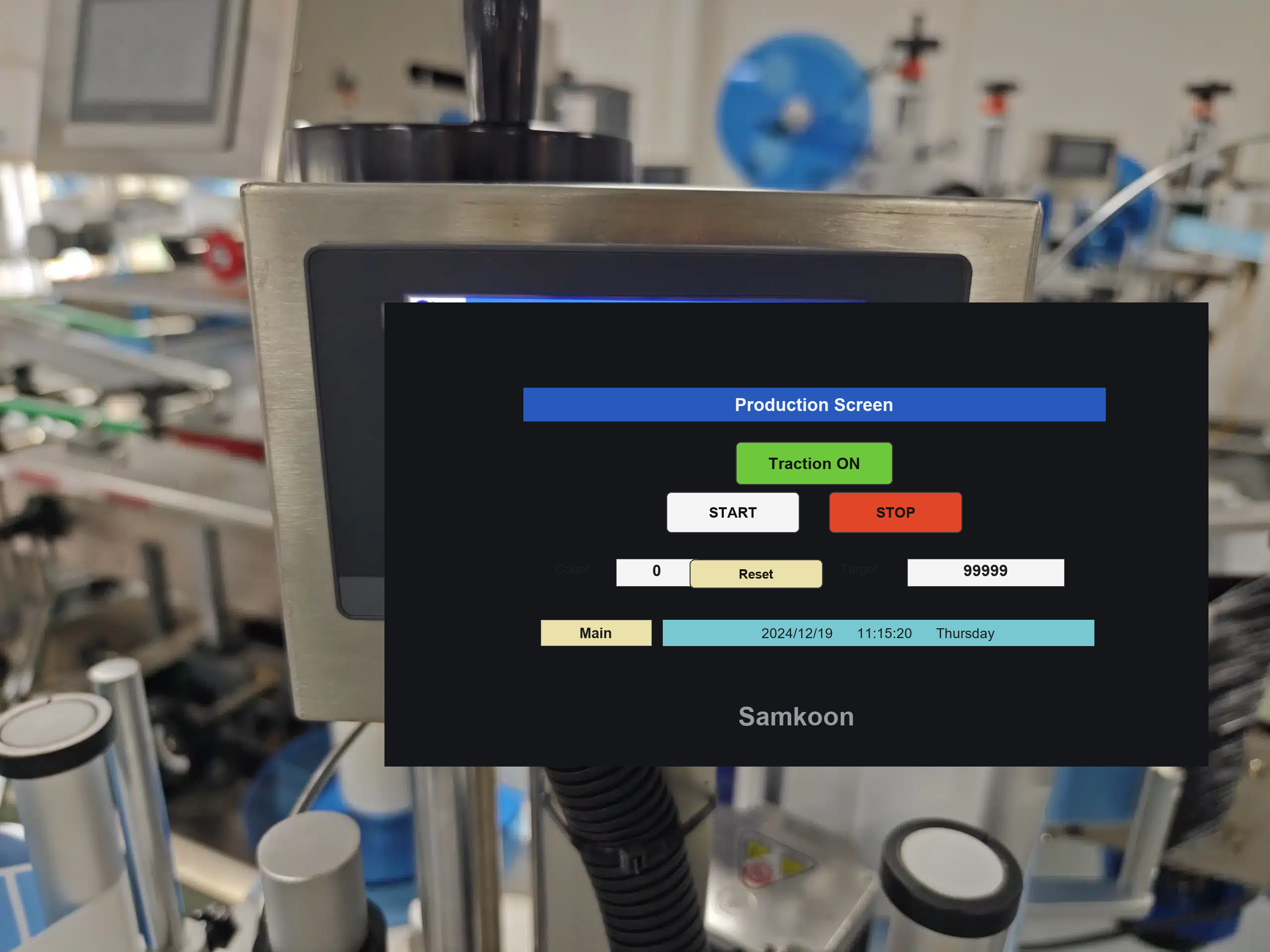
The route decides the project the buyer needs. A like-for-like swap needs the current screen application and its recipes. A converted or ported screen needs the source project, because a compiled file cannot be edited into a new interface. One fact decides the form of the copy bought in Step 2. The panel build is a separate deliverable, covered by the three routes for a listed control panel.
More often than not, the screen is the artefact held only by the builder, because the panel ships with the machine and the project file stays on a laptop that leaves site.
Step 5: Re-verify the Line After the Screen Is Loaded
Which Points Does the I/O Check Have to Cover?
An I/O check is a tag-by-tag walk of the machine’s input and output list with the line dead, and a screen replacement is the event that makes the list earn its place. The list already exists on a modern machine, and the six-row structure in our note on building an I/O list covers the shapes a buyer will meet.
The check covers four groups. First, every input that reports a bottle, a label, a cap or a guard. Second, every output that drives a motor, a cylinder, a lamp or a reject. Third, every interlock that can stop the line. Fourth, every registration value that a recipe sets.
For instance, one person reads the list at the cabinet and a second person confirms the physical action at the machine, and both initials go on the sheet.
Which Functions Must Be Proved Before the First Saleable Bottle?
A screen re-verification is a set of proofs that the machine still does what the order says after the panel has changed, and a screen that lights up proves none of the four proofs. Step 5 has a fixed order. First, the recipe restore: load a stored recipe, check the values against the recorded set, then save one to prove the write path works. Second, the interlock and stop test, including the guard circuit and the emergency stop. Third, the registration or applicator calibration, because a replacement panel often resets a reference taught on the old panel. Fourth, the first article, run on production bottles and labels at the rated speed.
In practice HiPaks runs trial labeling on the buyer’s own bottles with video returned before shipment, and the same discipline belongs after a screen swap in 2026: keep the first article, date the sheet, and sign it.
Step 6: Put Dates and Triggers in the Obsolescence Plan
An obsolescence management plan is a dated document that says what happens when an item stops being obtainable. The parts of the plan, according to IEC 62402:2019, are a policy, an infrastructure and organisation, the plan itself, strategies to minimise obsolescence during design, a chosen resolution and a measurement of the outcome. A plan without a date and a trigger is a statement of intent.
Step 6 of the order puts four triggers in writing. First, a last-time-buy notice from the maker of the panel or the controller. Second, a model superseded with no drop-in replacement. Third, the end of a support bulletin or a tool version. Fourth, a supplier exit from that market.
In practice each trigger needs a date beside the answer. A review date, a named owner and a spare held on site turn a plan into a schedule, and a schedule is what a buyer can act on in year three.
Step 7: Sign the Register, and Leave One Row Blank
Which Rows Can a Supplier Sign, and Which One Cannot?
A supplier can sign what the supplier controls, and a handover register is useful only if the boundary is drawn before the signature. Four rows sit inside that control: the media and file set delivered, the licence held in the supplier’s name, the parts list tied to the I/O list, and the obsolescence plan for the items the supplier buys.
Four rows sit outside. A supplier cannot certify that an archive opens on the buyer’s tools. A supplier cannot promise that a third-party panel stays obtainable. A supplier cannot warrant a program edited by another party. A supplier cannot transfer copyright in a library built by a third party.
In practice the blank row is the one that matters: the buyer’s own competence, which only the buyer can evidence, and which the technician competence test is designed to record. The nine rows below are the register, and a factory quote can be built around them.
What Nine Rows Does the Register Carry?
| Item | Who holds it today | What makes it usable | What it does not cover |
|---|---|---|---|
| Source project | The builder | Opens on a named tool version | The right to edit |
| Compiled application | The builder, in the machine | Matches the build running now | Any future change |
| Screen application and recipes | The builder | Recipe set restored and checked | A different panel model |
| Licence, key or dongle | The software supplier | Names the buyer as holder | Copyright in the library |
| I/O list | The builder | Every tag proved after a swap | Wiring altered on site |
| Spare screen | The buyer’s store | Fits the current panel and build | The program inside the machine |
| Obsolescence plan | The builder | Dated triggers and a review owner | Items bought elsewhere |
| End-of-support letter | The builder | A date in writing | Support after that date |
| Buyer competence record | The buyer | An unassisted technician test | The builder’s service notes |
Frequently Asked Questions
Who Owns the PLC Program After the Machine Is Paid For?
The builder usually owns the copyright in the application program, and the buyer holds a licence to run it. Payment buys the machine, not the source files.
Is an Escrow Copy the Same as a Delivered Source Project?
No. An escrow holds a copy against named release events, while a delivered source project sits in the buyer’s hands and opens on the buyer’s tools.
What Has to Be Re-verified After a Replacement Screen?
The I/O list tag by tag, the recipes, the interlocks and stop circuits, the registration calibration, and a first article at rated speed. The tester signs the sheet.
How Was This Article Researched?
The research run behind this article returned no captured answer from any model, so nothing here is attributed to an AI reply. The sources are IEC TR 61131-4 and IEC 62402:2019.
